Light stays on all the time
The bucket is empty, but the full indicator stays lit and the unit will not run or shuts right back off.
Start here: Start with bucket removal, float movement, and a careful reinstall.
When an LG dehumidifier bucket full light stays on, the unit usually thinks the bucket is still full or not installed correctly. Most causes are bucket seating, a stuck float, grime near the switch, or a failed bucket-full switch.
Start with the bucket itself: empty it, wash it out, make sure the float moves freely, and slide the bucket back in square and fully seated.
This is usually a physical bucket-sensing problem. If the bucket feels loose, the float hangs up, or the bucket has to be shoved to make the light change, stay focused there first. Reality check: a dehumidifier can act dead with a perfectly good compressor if the bucket-full circuit never resets. Common wrong move: forcing the bucket in harder and cracking the guides or float.
Don’t start with: Don’t start by ordering electronics or tearing the cabinet apart. This problem is more often a bucket fit or float issue than a major internal failure.
On this symptom, the useful first look is the bucket, float, and switch contact area. A slightly crooked bucket can keep a good dehumidifier from starting.
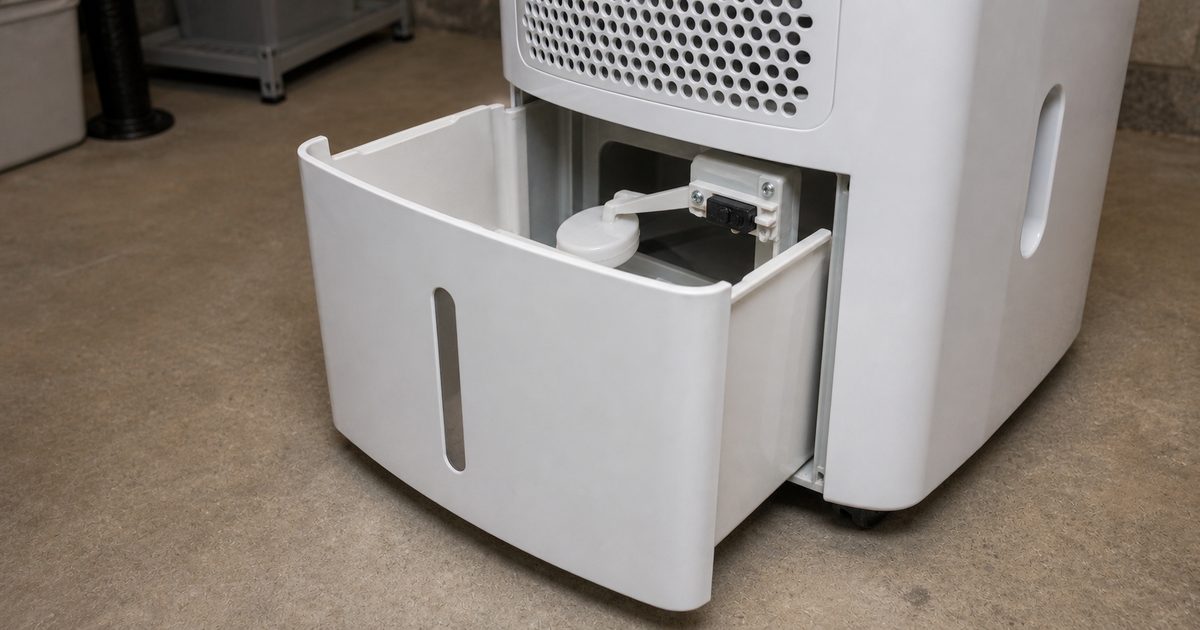
The bucket is empty, but the full indicator stays lit and the unit will not run or shuts right back off.
Start here: Start with bucket removal, float movement, and a careful reinstall.
The light flickers or goes out only when you push up, lift, or hold the bucket a certain way.
Start here: Look for a bucket that is not seating square, worn bucket tabs, or a switch lever that is barely being touched.
The unit worked before, then the light stayed on after the bucket was washed, bumped, or reinstalled.
Start here: Check that the float was not knocked out of position and that the bucket is fully dry around the switch contact area.
A hose is attached for continuous drain, but the unit still reports bucket full or refuses to run.
Start here: Confirm the bucket or drain insert is still installed the way this unit expects, and make sure the drain path is not backing water up into the bucket area.
This is the most common cause, especially when the light changes if you push or wiggle the bucket. A small misalignment is enough to keep the switch from resetting.
Quick check: Pull the bucket out, inspect the rails and front lip, then slide it back in slowly with even pressure until it sits flush.
If the float hangs up from slime, mineral residue, or a bent guide, the unit reads full even with an empty bucket.
Quick check: Move the float by hand. It should rise and fall freely without rubbing or catching.
Dust, residue, or a little standing water near the switch can keep the mechanism from moving cleanly or can make the bucket sit slightly off.
Quick check: With the unit unplugged, inspect the switch contact area and bucket cavity for gunk, broken plastic, or pooled water.
If the bucket and float move normally and the light never reacts at all, the switch itself may be stuck or electrically failed.
Quick check: Watch or feel the switch area while reinstalling the bucket. If the bucket clearly reaches it but the light never changes, the switch is a strong suspect.
A bucket that is just a little off track will hold the full light on, and this is the fastest no-parts check.
If the light goes out and the unit starts normally, the problem was bucket seating or a minor fit issue. If the light stays on, move to the float and switch checks.
The machine will not run until it sees the bucket in the right position and the full signal cleared.
A stuck float is the next most common cause after a mis-seated bucket, and it often looks exactly like a bad switch.
If the light clears after the float moves freely, the float was hanging up and the repair is done. If the float moves freely but the light still stays on, inspect the bucket cavity and switch area next.
The bucket-full signal may have been coming from a float that was physically stuck in the full position.
If the bucket and float are fine, the next likely problem is where the bucket meets the unit. Dirt, residue, or a bent contact point can keep the full signal on.
If cleaning or straightening the contact area lets the light go out, the issue was blockage or poor contact at the bucket switch area. If the bucket clearly reaches the switch area and nothing changes, the switch itself is the likely failed part.
At this point you want to separate a simple mechanical miss from a failed dehumidifier bucket-full switch before buying anything.
If the light changes when the actuator is moved or when the bucket contacts it correctly, the issue was alignment or a sticky mechanism rather than a dead switch. If there is no response at all, the switch has likely failed and replacement is the sensible next move.
The last step is to either replace the confirmed failed part or stop before turning a simple dehumidifier problem into cabinet or wiring damage.
A good result: If the unit runs normally and the light comes on only when the bucket is truly full, the repair is confirmed.
If not: If the light still stays on after the bucket, float, and switch path checks, the problem is deeper in the control circuit and it is time for appliance service.
You’ve covered the common homeowner-fix causes and avoided guess-buying the wrong part.
As an Amazon Associate I earn from qualifying purchases. Repair Riot may earn a commission at no extra cost to you.
Usually the bucket is not seated quite right, the float is stuck up, or the bucket-full switch is not resetting. Start with the bucket fit and float before assuming an electrical failure.
Only as a short test. If it runs only when you hold or shove the bucket, the bucket alignment or switch contact is still wrong and it will come back. Fix the fit issue before regular use.
Not usually. On this symptom, the bucket, float, and bucket-full switch are much more likely than the pump. A pump problem usually shows up more as poor draining or water backing up.
If the float feels sticky, hangs up, or does not drop on its own after cleaning, stay with the float side. If the float moves normally and the light never reacts even with the bucket fully seated, the switch is the stronger suspect.
Not necessarily. Many dehumidifiers still need the bucket or drain insert positioned correctly, and a blocked drain path can still leave water where the unit reads full. If the hose setup is involved, check for a drain issue too.
No, not first. A bad control is much less common than a bucket fit problem, stuck float, or failed bucket-full switch. Work through those physical checks before considering deeper electrical parts.