Light stays on all the time
The bucket is empty, but the full light is on as soon as the unit powers up and the compressor never starts.
Start here: Check that the bucket is fully seated and the float is not stuck up.
When a dehumidifier bucket full light stays on, the usual cause is a bucket that is not fully seated, a float that is stuck up, or a bucket switch that is not being pressed correctly.
Start with the bucket and float. Empty the bucket, clean slime or scale from the float area, and slide the bucket back in slowly until it sits flat and square.
This is usually a mechanical sensing problem. The machine is looking for one signal: bucket in place and not full. If that signal never changes, the light stays on and the unit will not run. Reality check: a bucket that looks installed can still sit slightly crooked and hold the light on. Common wrong move: forcing the bucket in harder and cracking the bucket lip or guide rails.
Don’t start with: Do not start by ordering a control board or taking the cabinet apart. Most of these turn out to be a bucket fit or float problem.
The bucket has to sit squarely and the float has to drop before the machine will run. If either part hangs up, the light can stay on with an empty bucket.
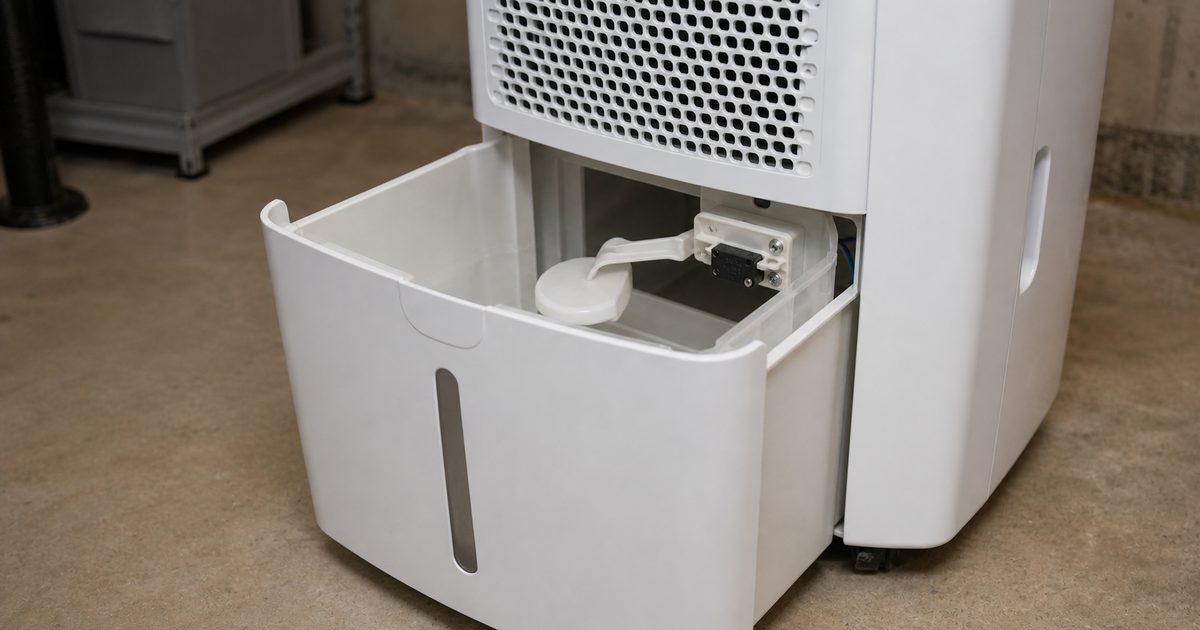
The bucket is empty, but the full light is on as soon as the unit powers up and the compressor never starts.
Start here: Check that the bucket is fully seated and the float is not stuck up.
The machine may start for a moment if you push up on the bucket or pull it slightly, then the light comes back.
Start here: Look for a warped bucket, dirty guide rails, or a switch lever that is barely being touched.
The unit worked before, then after removing the bucket the light stayed on even though nothing looks broken.
Start here: Recheck bucket orientation, float position, and any tabs or rails that may not be lined up.
Water remains in the bucket area or the machine acts full too soon.
Start here: Make sure the bucket is actually empty and the float chamber is clean, then inspect the switch area for residue or damage.
This is the most common reason. The bucket has to hit the switch or sensor point exactly, and even a small tilt can keep the full light on.
Quick check: Pull the bucket out, inspect the rails and bucket lip, then slide it back in slowly with both hands so it sits flat.
Soap film, mineral scale, slime, or a warped float can make the machine think the bucket is already full.
Quick check: Move the float by hand. It should rise and drop freely without hanging up.
A bent lever, sticky switch plunger, or packed lint around the switch can stop the full signal from resetting.
Quick check: With the unit unplugged, look into the bucket cavity for a small lever, tab, or plunger that does not move freely.
If the bucket fits correctly and the float moves freely but the light never changes, the switch itself may no longer be responding.
Quick check: Press the switch by hand with the bucket removed and see whether the light behavior changes when power is restored.
A surprising number of stuck bucket-full calls are just a seating problem, especially after the bucket was removed in a hurry.
If the bucket full light goes out and the unit starts normally, the problem was bucket fit or residue on the seating surfaces. If the light stays on, move to the float check next.
The machine still is not seeing a clear empty-bucket signal.
If the float stays up, the machine reads the bucket as full even when it is empty.
If the light clears after cleaning or freeing the float, the float was sticking in the full position. If the float moves normally and the light still stays on, inspect the switch area inside the machine.
The bucket itself is probably not the only issue.
The switch area often collects lint, residue, or gets bent just enough that the bucket no longer presses it correctly.
If the switch was jammed by debris and now moves freely, reinstall the bucket and retest. If the switch feels loose, bent, stuck, or does not return properly, the switch or its mounting is likely the problem.
This separates a bad bucket or float fit from a switch that is not changing state at all.
If pressing the switch changes the light, the switch is probably good and the bucket, float, or alignment is the real issue. If pressing the switch does nothing and the bucket fit is clearly good, the dehumidifier bucket switch or water level switch is the strongest suspect.
By this point you should know whether the problem is bucket fit, float movement, or the switch itself.
A good result: If the light clears and the unit runs through a normal collection cycle, the repair is complete.
If not: If the light remains on after the bucket and switch path checks out, deeper electrical diagnosis is needed.
You have ruled out the common mechanical causes and reached the limit of sensible homeowner troubleshooting.
As an Amazon Associate I earn from qualifying purchases. Repair Riot may earn a commission at no extra cost to you.
Usually the bucket is not seated all the way, the float is stuck up, or the dehumidifier bucket switch is not resetting. Start with the bucket fit and float before assuming an electrical failure.
No. That usually means the bucket is warped, the guides are dirty, or the switch is barely being contacted. It may run for now, but it tends to get worse and can lead to overflow or a broken switch tab.
Remove the bucket and move the float by hand. If it hangs up, stays high, or feels rough instead of moving freely, that is a strong clue. Cleaning often fixes it unless the float is damaged.
If the bucket fits correctly, the float moves freely, and pressing the switch by hand does not change the bucket full light, the switch is the likely failed part.
Not first. On this symptom, the bucket, float, and switch path are far more common than a board failure. Rule those out before spending money on deeper electrical parts.